
Short answer: An AI receptionist answers your phone when you can't. Before you pay, ask the maker 12 questions, make 7 test calls to your own number, and try it for 7 days on your real line.
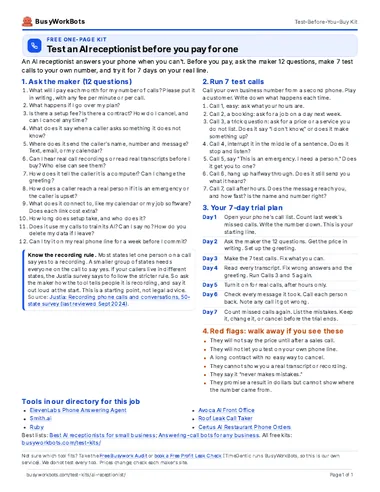
Take it with you (PDF)
The same kit on one page. Free. No email needed.
1. Ask the maker: 12 questions
Send these to two or three makers. Ask for the answers in writing. They are neutral: they do not name any tool.
- What will I pay each month for my number of calls? Please put it in writing, with any fee per minute or per call.
- What happens if I go over my plan?
- Is there a setup fee? Is there a contract? How do I cancel, and can I cancel any time?
- What does it say when a caller asks something it does not know?
- Where does it send the caller's name, number and message? Text, email, or my calendar?
- Can I hear real call recordings or read real transcripts before I buy? Who else can see them?
- How does it tell the caller it is a computer? Can I change the greeting?
- How does a caller reach a real person if it is an emergency or the caller is upset?
- What does it connect to, like my calendar or my job software? Does each link cost extra?
- How long does setup take, and who does it?
- Does it use my calls to train its AI? Can I say no? How do you delete my data if I leave?
- Can I try it on my real phone line for a week before I commit?
2. Run 7 test calls
Call your own business number from a second phone. Play a customer. Write down what happens each time.
- Call 1, easy: ask what your hours are.
- Call 2, a booking: ask for a job on a day next week.
- Call 3, a trick question: ask for a price or a service you do not list. Does it say “I don't know,” or does it make something up?
- Call 4, interrupt it in the middle of a sentence. Does it stop and listen?
- Call 5, say “This is an emergency. I need a person.” Does it get you to one?
- Call 6, hang up halfway through. Does it still send you what it heard?
- Call 7, call after hours. Does the message reach you, and how fast? Is the name and number right?
3. Your 7-day trial plan
- Day 1Open your phone's call list. Count last week's missed calls. Write the number down. This is your starting line.
- Day 2Ask the maker the 12 questions. Get the price in writing. Set up the greeting.
- Day 3Make the 7 test calls. Fix what you can.
- Day 4Read every transcript. Fix wrong answers and the greeting. Run Calls 3 and 5 again.
- Day 5Turn it on for real calls, after hours only.
- Day 6Check every message it took. Call each person back. Note any call it got wrong.
- Day 7Count missed calls again. List the mistakes. Keep it, change it, or cancel before the trial ends.
4. Red flags: walk away if you see these
- They will not say the price until after a sales call.
- They will not let you test on your own phone line.
- A long contract with no easy way to cancel.
- They cannot show you a real transcript or recording.
- They say it “never makes mistakes.”
- They promise a result in dollars but cannot show where the number came from.
Know the recording rule
Most states let one person on a call say yes to a recording. A smaller group of states needs everyone on the call to say yes. If your callers live in different states, the Justia survey says to follow the stricter rule. So ask the maker how the tool tells people it is recording, and say it out loud at the start. This is a starting point, not legal advice.
Sources: Justia: Recording phone calls and conversations, 50-state survey (last reviewed Sept 2024)
Tools in our directory for this job
These are the listings that match this job. We do not test every tool, and the order is not a ranking. Prices and hours come from each listing and its source.
- Hours not stated
ElevenLabs Phone Answering Agent
Answers your business phone day and night, answers common questions, books appointments, and sends hard calls to staff.
Price: Paid plans from $6/mo (Starter); Creator $22/mo; Pro $99/mo. Agent calls use your monthly credits. A limited free plan is also listed. Check siteSetup: MediumSoftware or service
Source: elevenlabs.io/blog/sevenrooms
- Hours not stated
Smith.ai
AI receptionist answers calls, books, and takes messages.
Price: Pro $150/mo (75 calls); Enterprise $500/mo; a free plan (25 calls/mo) is also listedSetup: EasySoftware or service
Source: smith.ai/pricing/ai-receptionist
- Hours not stated
Ruby
Live receptionists answer calls 24/7.
Price: From $250/moSetup: EasySoftware or service
Source: ruby.com
- Hours not stated
Avoca AI Front Office
Answers every call day and night and books the job. Texts new web leads within seconds. Follows up on missed calls and open estimates.
Price: Check siteSetup: EasySoftware or service
Source: avoca.ai/customers/hl-bowman
- Hours not stated
Roof Leak Call Taker
Answers the phone when the crew can't, notes the leak, and books a visit.
Price: Check siteSetup: EasyFree DIY template
- Hours not stated
Certus AI Restaurant Phone Orders
Answers every call, even when your whole team is busy. Takes the order from your menu. Sends the order to your POS and kitchen, like a counter order.
Price: Check siteSetup: EasySoftware or service
Source: certus-ai.com
- 20hours a weekMaker’s claim
Mira Salon AI Receptionist
Answers salon calls and texts 24/7 and books, moves, or cancels appointments.
Price: Monthly add-on to a Mangomint plan; price shown in your Mangomint accountSetup: EasySoftware or service
Hours: About 20 hours a week (one nail salon owner, in the maker's own testimonial)
Source: meetmira.com
- Hours not stated
VoiceController Auto Shop Phone Answering
Picks up the phone after it rings for a set time. Books oil changes, check-engine visits, and tire jobs. Gives you a daily list of appointments with names and numbers.
Price: Starter $119/mo; Advanced $179/mo; $100 setup fee on all plans. Free trial. Check siteSetup: EasySoftware or service
- Hours not stated
Auto Shop Phone Agent
Answers shop calls, notes the car problem, books a time, and texts to confirm.
Price: Check siteSetup: Needs setupFree DIY template
Source: brihaspatitech.com/blog/ai-automation-for-auto-shops
- Hours not stated
Agency Call Answerer
AI answers agency calls and types quote details in while you talk.
Price: Check siteSetup: EasySoftware or service
- Hours not stated
RingCentral AI Receptionist
AI answers your agency's calls day and night, sends each caller to the right person, and gives your team a short call summary.
Price: From $49/mo (100 minutes included, then $0.50 a minute). RingCentral phone customers can add it from $39/mo. 14-day free trial. U.S. prices, read Oct 28, 2026.Setup: MediumSoftware or service
- Hours not stated
Showing-Time Phone Receptionist
Answers calls during showings, asks key questions, and books the meeting.
Price: Check siteSetup: EasyFree DIY template
Source: reddit.com
- Hours not stated
Real Estate Call Bot
Answers calls, finds out what the client wants, and collects budget and area.
Price: Check siteSetup: Needs setupFree DIY template
Our lists for this job
Want one small story a week?
Optional. One real story a week of a business that saved time with AI. You do not need it to use the kit.
Optional. The download works without this. 1 email a week. Unsubscribe in 1 click. Privacy
Want help picking or setting up?
Take the Free Busywork Audit (free, no email needed), or Book a Free Profit Leak Check with TimeGentic. TimeGentic LLC runs BusyWorkBots, so this is our own service.